





How to Customize the WooCommerce My Account Page for a Better Customer Experience
For many WooCommerce stores, the My Account area is one of the most important parts of the customer journey. It is where users check orders, manage addresses, update account details, and interact with your store after purchase. Yet, the default WooCommerce account page can feel limited if you want to create a branded, user-friendly experience.
If you want more control, Customize My Account Page by ThemeGrill is a practical WooCommerce plugin that helps you add custom tabs, reorder menu items, personalize content, and improve the layout of the account dashboard without heavy development work.
In this article, we will look at what this plugin does, why customizing the account area matters, and which features can help you build a more useful customer dashboard.
Why Customize the WooCommerce My Account Page?
The default WooCommerce account page works well for basic stores, but growing businesses often need more flexibility. You may want to:
- Add new tabs for FAQs, loyalty information, downloads, or support resources
- Hide tabs that are not relevant to your customers
- Reorder account menu items to highlight the most important actions
- Match the page design to your store branding
- Display personalized messages or dynamic customer information
- Create role-specific account experiences for different user types
A better account page can improve navigation, increase engagement, and make post-purchase interactions easier for customers.
What Is Customize My Account Page?
Customize My Account Page is a premium WordPress plugin for WooCommerce that allows you to register custom tabs on the My Account page and customize its design and structure. It is designed for store owners who want more control over endpoints, content, menu order, and customer-facing account elements.
The plugin is compatible with WordPress 5.5+, requires PHP 7.4+, and has been tested up to WordPress 7.0.4. It is released under the GNU General Public License v3.0.
Key Features That Make This Plugin Useful
1. Modify Default WooCommerce Endpoints
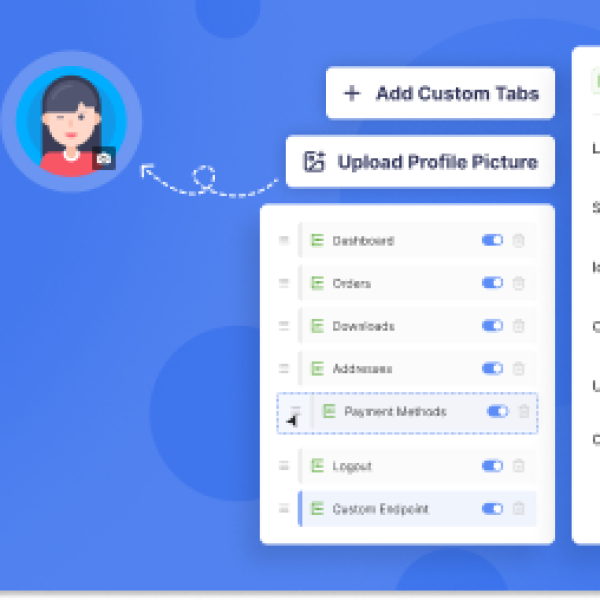
WooCommerce includes standard endpoints such as Dashboard, Orders, Downloads, Addresses, Payment Methods, Account Details, and Logout. With this plugin, you can modify or disable these default endpoints more easily.
This is especially useful when you want to simplify the customer dashboard or remove sections that do not apply to your store model.
2. Add Custom Endpoints
One of the strongest features is the ability to create custom endpoints. You can define a unique label, slug, icon, and content for each tab.
This gives you a flexible way to add new sections such as:
- Support center
- Membership details
- Rewards program information
- Onboarding instructions
- Private resources for logged-in customers
3. Create Unlimited Links
In addition to custom endpoints, the plugin lets you create unlimited menu links that point to internal store pages or external websites. You can choose whether links open in the same tab or a new browser tab.
This is a simple way to connect customers to important destinations directly from their account area.
4. Hide or Show WooCommerce Tabs
Not every default WooCommerce tab needs to be visible. The plugin includes one-click controls to hide or show account tabs based on your needs.
This can help reduce clutter and keep the account page focused on the actions that matter most.
5. Style Endpoints with Labels, Icons, and Custom Classes
The account menu can be made more visual and easier to scan. You can change endpoint labels, assign icons, upload custom icons, and use custom classes for additional styling.
For stores that care about consistent branding, these styling options make the account area feel more integrated with the rest of the site.
6. Custom Profile and Avatar Support
The plugin allows WooCommerce users to upload custom profile images for their account page. It supports PNG and JPG file types and also includes default placeholder support.
This can be useful for stores with communities, memberships, or customer portals where a more personal account experience is valuable.
7. Role-Based Endpoint Visibility
Some account tabs should only be available to specific user roles. With role-specific endpoint visibility, you can limit certain sections to selected user types.
For example, you could create different account experiences for wholesale customers, subscribers, members, or retail buyers.
8. Drag-and-Drop Menu Reordering
The plugin includes a drag-and-drop interface for changing the layout of the account menu. You can reorder both default WooCommerce endpoints and custom tabs quickly.
This feature is helpful when you want to prioritize commonly used sections like Orders or Downloads and move less important items lower in the menu.
9. Custom Account Page Content with WYSIWYG Editing
Content personalization is another strong point. The built-in WYSIWYG editor allows you to add formatted text, media, HTML, and shortcode-based content inside custom account sections.
This means you can turn the account page into more than a utility area. It can become a place for education, cross-selling, support, or onboarding.
10. Smart Tags for Personalized Customer Content
The plugin supports smart tags that let you dynamically insert customer and site information into account page content. Available data includes:
- User ID
- User name
- User email
- First name and last name
- Display name
- User IP address
- Site name and URL
- Page URL
- Current date and time
- Billing and shipping details
- Billing and shipping company information
This helps you create personalized messages and account sections without manual editing for each customer.
Premium Features Worth Noting
The Pro version expands the plugin with additional tools for store owners who want a more advanced My Account experience.
Visual Customizer
You can style the My Account page without code using controls for color palettes, layout styles, profile settings, and responsive spacing.
Add Group
Menu items can be organized into groups, making larger account menus more structured and easier to navigate.
Set Default Endpoint
You can choose which endpoint opens first when a customer visits the My Account page. This is useful if you want to direct users to a custom dashboard, support tab, or welcome section.
AJAX Navigation
With AJAX-based navigation, account tabs can load instantly without full page refreshes. This creates a smoother and more modern browsing experience.
How to Use Customize My Account Page
Getting started is straightforward:
- Install and activate the plugin on your WordPress site
- Go to WooCommerce > Customize My Account Page
- Use the drag-and-drop interface to reorder menu items
- Create custom endpoints or links
- Adjust labels, icons, visibility, and content
- Save your changes and preview the account page
This setup process makes the plugin accessible even for users who do not want to edit WooCommerce templates manually.
Who Should Use This Plugin?
Customize My Account Page is a strong fit for:
- WooCommerce store owners who want a more branded customer account area
- Membership and subscription sites needing custom account sections
- Wholesale stores with role-specific customer dashboards
- Agencies building tailored WooCommerce experiences for clients
- Businesses that want to improve post-purchase engagement
Final Thoughts
If the default WooCommerce My Account page feels too limited, Customize My Account Page offers a practical way to improve it. From custom tabs and drag-and-drop ordering to personalized content and user-role controls, the plugin gives store owners more flexibility without forcing a complex development process.
Whether you want to simplify the customer dashboard or turn it into a richer account hub, this plugin provides the tools to create a more polished and useful WooCommerce experience.
For stores that want deeper design control and smoother navigation, the premium features such as the visual customizer, grouped menu items, default endpoint selection, and AJAX navigation add even more value.
Want to know more about this product? Check out the product page.